We got loved!
Guy Ellis over at guyellisrocks.com gave NinjaCamp a nice mention regarding Ditto, the great clipboard manager for Windows.
I highly recommend the developers out there grab this tool as it saves my ass again and again!
Happy Coding!


 Make the first comment!
 Posted By:
Unknown
Posted By:
Unknown
myButton.buttonMode = "true";
myClip.parent.parent.parent.myMethod();The compiler is more strict and so they've changed the syntax a bit. I want this to be a beginner's tutorial so I won't go into detail about that, let's work on the new way to do things!
function traceParent():void
{
trace("You've succesfully called on the parent!");
}
Easy, just a trace statement to see if what we code inside the clip is correct. Now, put a clip on the stage and INSIDE the clip put this script:myButton.addEventListener(MouseEvent.CLICK, callOnParentClip);
function callOnParentClip(ev:MouseEvent)
{
(this.parent as MovieClip).traceParent();
}
Pretty easy! Above the content inside this clip, make sure you make a button called myButton to call this function. The key line is here:(this.parent as MovieClip).traceParent();You can see that now we have to cast the clip as a MovieClip specifically. What about if we have a clip more than one level deep? This is how you would handle that:
(this.parent.parent.parent as MovieClip).traceParent();
Tweener.addTween(page1Content, {alpha:0, x:-266, time:1, onComplete:hidePage1Content});
Tweener.addTween(page1Content, {alpha:0, x:-266, time:1, onComplete:function() { this.visible = false; }});
It would of course be nice if Microsoft slapped a unit on there; for my measure I increased mine to 50000 donkeys.
Now, all of your jQuery commands can be accessed using "$j" or whatever else you would like to use. However, that is where the problem with Visual Studio Intellisense pops up.
<script type='text/javascript' src='jqueryJs.js'></script>
<script type='text/javascript'>
 var $j = jQuery.noConflict();
</script>
This line identifies the jQuery commands to the IDE. Thus, all you need to do is modify it so that it includes your new command value:
jQuery = window.jQuery = window.$ = function(selector, context) {
Once it is saved and visual studio has a chance to repost, you will instantly start seeing the intellisense results following "$j" or whatever command you choose.
jQuery = window.jQuery = window.$ = window.$j = function(selector, context) {
myBtn.addEventListener(MouseEvent.CLICK, gotoUrl);

function gotoUrl(ev:MouseEvent):void
{
var url:String = "http://www.ninjacamp.com";
var request:URLRequest = new URLRequest(url);
try {
navigateToURL(request, '_blank');
} catch (e:Error) {
trace("Error occurred!");
}
}
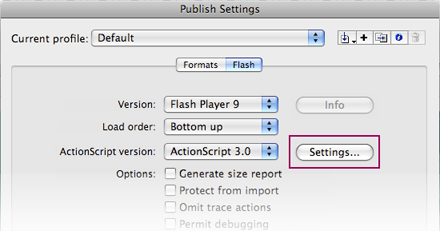
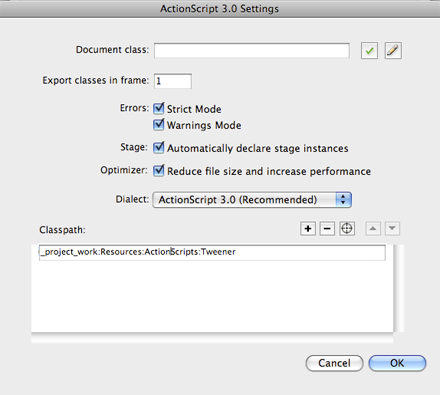
import caurina.transitions.Tweener;

bubbleAnimation();

function bubbleAnimation():void
{
Tweener.addTween(bubble1, {scaleX:1.6, scaleY:1.6, time:5, transition:"easeOutElastic"});
Tweener.addTween(bubble1, {scaleX:1, scaleY:1, time:5, transition:"easeOutElastic", delay:5});
Tweener.addTween(bubble2, {scaleX:1.5, scaleY:1.5, time:4, transition:"easeOutElastic", delay:1});
Tweener.addTween(bubble2, {scaleX:1, scaleY:1, time:4, transition:"easeOutElastic", delay:5});
Tweener.addTween(bubble3, {scaleX:1.4, scaleY:1.4, time:5, transition:"easeOutElastic", delay:2});
Tweener.addTween(bubble3, {scaleX:1, scaleY:1, time:5, transition:"easeOutElastic", delay:7});
Tweener.addTween(bubble4, {scaleX:1.7, scaleY:1.7, time:4, transition:"easeOutElastic", delay:3});
Tweener.addTween(bubble4, {scaleX:1, scaleY:1, time:4, transition:"easeOutElastic", delay:7});
Tweener.addTween(bubble5, {scaleX:1.6, scaleY:1.6, time:5, transition:"easeOutElastic", delay:4});
Tweener.addTween(bubble5, {scaleX:1, scaleY:1, time:5, transition:"easeOutElastic", delay:9, onComplete:bubbleAnimation});
}
Tweener.addTween(bubble1, {scaleX:1.6, scaleY:1.6, time:5, transition:"easeOutElastic"});
onComplete:bubbleAnimation